Showing posts with label code snippet. Show all posts

Jun 11, 2026

Email Template to populate dynamic values from any entity

 Email Templates of Dynamics 365/ Dataverse is very useful yet its one big limitation is it only can dynamically populate values of a one Entity type. Word Document templates don't have that limitation but it is actually for generation of a document not to use in Email content. Alternatively, Word Document Templates can be used to generate a document and attach to email which is widely done.

Today we will see how to programmatically enhance the usual Email Template to have any value. Below are the steps we do.

1) When creating Email Template, introduce special tags for dynamics values we plan to populate from other entities

2) Create email with Template in Draft status.

3) Replace special tags we introduce (Template will have many other dynamic fields as usual from specific Entity type it designed to fetch data from)

4) Send the Email

Please refer Programmatically create a draft Email using Email Template (C#) for steps 2 and 4.

Lets check how code would flow with the newly introduced method. Obviously values you need to populate should be query first to replace the tags.

// Step 2: Create Draft Email
// email object is defined here

// Step 3: Replace special tags
ReplaceEmailContent(email, "{{Coordinator}}", <Value need to populate>);
ReplaceEmailContent(email, "{{ContractId}}", <Value need to populate>);

// Step 4: Send Email

// Method to call
public Entity ReplaceEmailContent(Entity email, string tagName, string tagValue)
{
    var secondValue = email.Attributes.Values.ElementAt(1);
    if (secondValue is string strValue)
    {
        var replaced = strValue.Replace(tagName, tagValue);
        var key = email.Attributes.Keys.ElementAt(1);
        email.Attributes[key] = replaced;
    }
    return email;
}

Same way, if we need to add dynamics tags to Subject of the email, that's also possible. For that, use below method.

public Entity ReplaceEmailSubject(Entity email, string tagName, string tagValue)
{
    var secondValue = email.Attributes.Values.ElementAt(0);
    if (secondValue is string strValue)
    {
        var replaced = strValue.Replace(tagName, tagValue);
        var key = email.Attributes.Keys.ElementAt(0);
        email.Attributes[key] = replaced;
    }
    return email;
}

Mar 14, 2025

Send Email with dynamic excel attachment

Sending an email with associated excel sheet with details of child records is a generic requirement and also great way to pass child record details to a customer. For example, you may need to send an email to a customer with quote details and associate quote products as a excel attachment. 

In my example I am sending email to a Account and Sender is a Queue (you may obviously use a System user). I am sending Opportunity details and associated excel will carry Opportunity Products. This Email will be shown in timeline of Opportunity hence regarding Object would be the Opportunity. 

I have two separate code snippets here.

1) Sending the Email with Template and Excel

What we need to understand is we should create the Email first and then send as two steps.. This way, we get a room prior to sending, to attach the excel. Note how we pass different Ids like Sender, Template, Receiver and Regarding Object here. Also notice that we pass the excel as the attachment body.

Public void SendEmailWithPaymentEvaluationDetails(Guid templateId, Guid toAccountId, Guid fromQueueId, Guid regOpportunityId)
{
    // Initiate Email
    InstantiateTemplateRequest request = new InstantiateTemplateRequest()
    {
        TemplateId = new Guid(templateId),
        ObjectId = invoiceRequest.Id,
        ObjectType = invoiceRequest.LogicalName
    };
    InstantiateTemplateResponse response = (InstantiateTemplateResponse)OrgService.Execute(request);
    Entity email = response.EntityCollection[0];
    Entity Fromparty = new Entity("activityparty");
    Entity Toparty = new Entity("activityparty");
    Toparty["partyid"] = new EntityReference("account", toAccountId);
    Fromparty["partyid"] = new EntityReference("queue", fromQueueId);
    email["from"] = new Entity[] { Fromparty };
    email["to"] = new Entity[] { Toparty };
    email["directioncode"] = true;
    email["regardingobjectid"] = new EntityReference("opportunity", regOpportunityId);
    Guid emailId = OrgService.Create(email);

    // Link the Attachment
    Entity attachment = new Entity("activitymimeattachment");
    attachment["subject"] = "OpportunityId Product List";
    attachment["filename"] = "OpportunityId Product List.xlsx";
    attachment["body"] = Convert.ToBase64String(CompileExcelFile(regOpportunityId));
    attachment["mimetype"] = "application/vnd.ms-excel";
    attachment["attachmentnumber"] = 1;
    attachment["objectid"] = new EntityReference(email.LogicalName, emailId);
    attachment["objecttypecode"] = email.LogicalName;
    OrgService.Create(attachment);

    // Send Email
    SendEmailRequest sendEmailRequest = new SendEmailRequest
    {
        EmailId = emailId,
        TrackingToken = string.Empty,
        IssueSend = true
    };
    SendEmailResponse sendEmailResponse = (SendEmailResponse)OrgService.Execute(sendEmailRequest);
}

2) Compilation of Excel

Here we compile the excel which is called in above method when preparing the attachment. 
In this technique, we need to have a view created in Opportunity Product and retrieve its Id to be used here. That's the Id you see in SavedQuery. Interestingly, though we assign an id of a saved view, we are defining dynamically what we need in the excel via our own Fetch query. Under grid section, we adjust the column widths etc.
 
public byte[] CompileExcelFile(Guid regOpportunityId)
{
    var exportToExcelRequest = new OrganizationRequest("ExportToExcel");
    exportToExcelRequest.Parameters = new ParameterCollection();
    exportToExcelRequest.Parameters.Add(new KeyValuePair<string, object>("View", new EntityReference("savedquery", new Guid("{4c523f5b-e8c5-4cb5-bc83-bf4ef934342d}"))));
    string stringFetchXml = @"<fetch distinct='false' no-lock='false' mapping='logical' returntotalrecordcount='true'>
                                <entity name='opportunityproduct'>
                                    <attribute name='lineitemnumber' />
                                    <attribute name='productname' />
                                    <attribute name='description' />
                                    <attribute name='baseamount' />
                                    <filter>
                                           <condition attribute='opportunityid' operator='eq' value='{0}' />
                                    </filter>
                                   </entity>
                            </fetch>";
    exportToExcelRequest.Parameters.Add(new KeyValuePair<string, object>("FetchXml", String.Format(stringFetchXml, regOpportunityId.ToString())));
    exportToExcelRequest.Parameters.Add(new KeyValuePair<string, object>("LayoutXml", @"
            <grid name='resultset' object='2' jump='lineitemnumber' select='1' icon='1' preview='1'>
                <row name='result' id='opportunityproductid'>
                    <cell name='lineitemnumber' width='100' />
                    <cell name='productname' width='200' />
                    <cell name='description' width='300' />
                    <cell name='baseamount' width='125' />
                </row>
            </grid>"));
    exportToExcelRequest.Parameters.Add(new KeyValuePair<string, object>("QueryApi", ""));
    exportToExcelRequest.Parameters.Add(new KeyValuePair<string, object>("QueryParameters", new InputArgumentCollection()));
    var exportToExcelResponse = OrgService.Execute(exportToExcelRequest);
    if (exportToExcelResponse.Results.Any())
        return exportToExcelResponse.Results["ExcelFile"] as byte[];
    else
        return null;
}

Hope this helps!

Feb 14, 2025

Programmatically create a draft Email using Email Template (C#)

Previously we discussed how to send an Email using a Email Template, but we noticed it just sends the email but no chance of create and save as a draft. In some instances we need to create the Draft email to be sent later after checking or/and modifications by the user. 

In such situations we can use below code. One can say its simply possible to use CREATE message of the Org service to achieve this but it is not possible to use a Template which is a constrain. 

By creating the draft first, it allows you to programmatically or manually attach attachments prior to sending the email.

Here InstantiateTemplateRequest  message does the magic.

 public void CreateDraftEmailToPrimaryContactOfAccount(Account account)
 {
     InstantiateTemplateRequest request = new InstantiateTemplateRequest()
     {
         TemplateId = new Guid("bf0b97c7-d5a3-4a3f-8771-a1cd737ab555"),
         ObjectId = account.Id,
         ObjectType = Account.LogicalName
     };
     InstantiateTemplateResponse response = (InstantiateTemplateResponse)OrgService.Execute(request);

     Entity email = response.EntityCollection[0];
     Entity Fromparty = new Entity("activityparty");
     Entity Toparty = new Entity("activityparty");
     Toparty["partyid"] = new EntityReference(Account.EntityLogicalName, account.PrimaryContactId.Id);
     Fromparty["partyid"] = new EntityReference("queue", new Guid("f14a45e9-fac5-4ba0-9a95-c07fe1adabf0"));
     email["from"] = new Entity[] { Fromparty };
     email["to"] = new Entity[] { Toparty };
     email["directioncode"] = true;
     email["regardingobjectid"] = new EntityReference(Account.EntityLogicalName, account.Id);
     Guid emailId = OrgService.Create(email);
}

When ready if you need to send the Email programmatically, below SendEmailRequest message can be used as below.

SendEmailRequest sendEmailRequest = new SendEmailRequest
{
     EmailId = emailId,
     TrackingToken = string.Empty,
     IssueSend = true
};
SendEmailResponse sendEmailResponse = (SendEmailResponse)OrgService.Execute(sendEmailRequest);

Related Posts
Programmatically send Email with Template (c#)

Programmatically send Email with Template (c#)

This is a code snippet that sends Email programmatically (in C#) while using an Email Template

Explained scenario, we send an Email to Primary Contact of the Account. We set Account as the regarding object of the Email so this Email activity will associate with Account and will be displayed in Account's timeline. Also we have to pass Account as the regarding object of Template since we want dynamic fields of Template to be filled with Account field values as necessary.

Actually SendEmailFromTemplateRequest message does the magic.

public void SendEmailToPrimaryContactOfAccount(Account account)
{
    Entity Fromparty = new Entity("activityparty");
    Entity Toparty = new Entity("activityparty");
    Toparty["partyid"] = new EntityReference(Contact.EntityLogicalName, account.PrimaryContactId.Id);
    Fromparty["partyid"] = new EntityReference("queue", new Guid("f14a45e9-fac5-4ba0-9a95-c07fe1adabf0"));
    Entity email = new Entity("email");
    email["from"] = new Entity[] { Fromparty };
    email["to"] = new Entity[] { Toparty };
    email["directioncode"] = true;
    email["regardingobjectid"] = new EntityReference(Account.EntityLogicalName, account.Id);

    SendEmailFromTemplateRequest emailUsingTemplateReq = new SendEmailFromTemplateRequest
    {
        Target = email,
        TemplateId = new Guid("bf0b97c7-d5a3-4a3f-8771-a1cd737ab555"),
        RegardingId = account.Id,
        RegardingType = Account.EntityLogicalName
    };
    var emailUsingTemplateRes = OrgService.Execute(emailUsingTemplateReq);
} 

Please note I am sending this email from a queue record. Obviously you can send from a system users as well. In such case, from activity party has to be changed accordingly.

One thing to note is, this method just sends the email, so you are not save Email in draft status.

Related Posts
Programmatically create a draft Email using Email Template (C#)

May 17, 2024

Execute Multiple

In some cases we need to repeat the same operation. It may be creating a collection of records or updating a collection or records. We are good to do those via available CRUD operations of the Organization Service.

However if we do a collection within a loop, we should understand we repeat the same operation that result number of server calls which is not sufficient. Particularly, if you need to do this within a synchronous process it important to complete quickly rather keeping the user waiting.

In such situations, we would do execute multiple operations. Lets check the code snippet.

var executeMultipleRequest = new ExecuteMultipleRequest
{
    Settings = new ExecuteMultipleSettings { ContinueOnError = true, ReturnResponses = false },
    Requests = new OrganizationRequestCollection()
};

for (int i = 0; i < 5; i++)
{
    var paymentevaluation = new Entity("contact")
    {
        ["firstname"] = $"Test First Name {i}",
        ["lastname"] = $"Test Last Name {i}",
    };

    executeMultipleRequest.Requests.Add(new CreateRequest { Target = paymentevaluation });
}

var data = (ExecuteMultipleResponse)service.Execute(executeMultipleRequest);

foreach (var response in data.Responses)
{
    Console.WriteLine($"{response.RequestIndex}: {response.Fault}..");
}
Notice that we add all the entities to be created and execute once in this code. This is significantly faster than going through a loop.
Notes
> Keep in mind, maximum number of requests can be added to a execution is 1000.
> This also had a limitation of 2 concurrent operations, but now its removed.

Oct 14, 2022

Refresh Sub Grid once Async operation is completed

This is a recent challenge came on my way. I had to refresh a sub grid of a form after an operation (say a field value change or Save). Challenge is Sub Grid values are being modified asynchronously through a server side logic. In summery, I have to delay the refresh till that happens.

If I elaborate this further, I have a field (i.e. Amount) in the form of Service entity. Once it is updated the server side logic will trigger and synchronously populate a field (i.e. Item Amount) of the child Service Item entity, which is the child record type of the grid.

While we need to run this Java Script on Save. Below is the code in my on Save script and I will explain each of the pieces  come with the functions being called.

var formContext = executionContext.getFormContext();
var dirtyAttributes = CheckDirtyFieldsOnForm(formContext);
if (dirtyAttributes != null && dirtyAttributes.length > 0 
   && dirtyAttributes.includes("new_amount")
   && formContext.getAttribute("new_amount") != null 
   && formContext.getAttribute("new_amount").getValue() > 0) {
	var childId = RetrieveChildRecordToBeUpdate(formContext);
	   if (childId != null) {
		IsServiceItemAmountSet(formContext, childId, 1);
	   }
      }

This is the first function, which identifies all the fields going to be updated. This returns and array where we need to check if Amount field is among them.

function CheckDirtyFieldsOnForm(formContext) {
  var attributes = formContext.data.entity.attributes.get();
  var dirtyAttributes = [];
  if (attributes != null) {
	for (var i in attributes) {
	   if (attributes[i].getIsDirty()) {
		dirtyAttributes.push(attributes[i].getName());
	      }
	   }
	}
  return dirtyAttributes;
}

If it returns Amount field, we know we need to refresh the grid. Lets retrieve the Service Item Id which we are interested in. (Note: even if there are more than one line items, selecting one is enough since we are going to use this item to check if async operation is completed)

function RetrieveChildRecordToBeUpdate(formContext) {
  var gridContext = formContext.getControl("grid_serviceitems");
    if (gridContext == null || gridContext == "undefined")
       return;

	var complGrid = gridContext.getGrid();
	var complRows = complGrid.getRows();
	var rowCount = complRows.getLength();
	if (rowCount == 0) {
			return;
	}
	for (var i = 0; i < rowCount; i++) {
	  var rowEntity = complRows.get(i).getData().getEntity();
        // Can add some logic if you have filter criteria for 
        // select line item
	  return rowEntity._entityId.guid;
	}
	return;
 }

Since we have Service Item Id, now we have to keep on checking by retrieving Service Item details through server calls (i.e. WebApi) if its updated. In our scenario what I need to check is if Item Amount is populated. Once it happen, we can refresh the grid since we know Sync operation is completed and refreshed grid will show the new values.

This is the recursive code that keep on checking if update has taken place.

function IsServiceItemAmountSet(formContext, Id, index) {
   Xrm.WebApi.online.retrieveRecord("new_serviceitem", Id, "?$select=new_itemamount").then(
      function success(result) {
	   if (result.new_lineamount != null && result.new_lineamount > 0) {
		formContext.getControl("grid_serviceitems").refresh();
		return true;
	   }
	   else {
		 return false;
	   }
	 },
	 function (error) { }
   ).then(function (isSuccess) {
	 if (!isSuccess && index < 5) {
	    index++;
	    setTimeout(function () {
		IsChildClaimAmountSet(formContext, Id, index);
	    }, 2000);
       }
   });
}

This function do recursive WebApi calls in 2 second intervals. Anyway, I am using an index to count these calls, since I need to prevent infinite loops in case of failure in service side logic. Hence maximum no of attempts is limited to 5. I assume within 10 seconds Async operation would have been completed.

Sep 27, 2020

Handling the 5000 limit of FetchXml retrievals

When we retrieve records with FetchXml, most annoying constrain is limit of records it returns which is 5000. Here, we are checking how to overcome this limitation.

Paging solution

If you browse the web, you will find a lot of solutions using paging. Which is pretty cool. I am showing here one of the good codes I tried. This worked for me. For example I am retrieving all the active contacts in my CRM.

internal static void MainFunction(IOrganizationService service)
        {
            string fetchXml = string.Format(@"<fetch version='1.0' output-format='xml-platform' mapping='logical' distinct='false'>
                                        <entity name='contact' >
                                            <attribute name='firstname' />
                                            <attribute name='lastname' />
                                            <filter>
                                                <condition attribute='statecode' operator='eq' value='0' />
                                            </filter>
                                        </entity>
                                       </fetch>");

            List<Entity> contacts = GetTotalRecordsfromFetch(fetchXml, service);
            Console.WriteLine("contacts : " + contacts.Count);
         }
        
        public static List<Entity> GetTotalRecordsfromFetch(string fetchXML, IOrganizationService orgService)
        {
            List<Entity> lstEntity = new List<Entity>();
            int fetchCount = 5000;
            int pageNumber = 1;
            string pagingCookie = null;

            while (true)
            {
                string xml = CreateXml(fetchXML, pagingCookie, pageNumber, fetchCount);
                RetrieveMultipleRequest fetchRequest = new RetrieveMultipleRequest
                {
                    Query = new FetchExpression(xml)
                };

                var returnCollections = ((RetrieveMultipleResponse)orgService.Execute(fetchRequest)).EntityCollection;

                if (returnCollections.Entities.Count >= 1)
                {
                    lstEntity.AddRange(returnCollections.Entities);
                }

                if (returnCollections.MoreRecords)
                {
                    pageNumber++;

                    pagingCookie = returnCollections.PagingCookie;
                }
                else
                {
                    break;
                }
            }
            return lstEntity;
        }

        public static string CreateXml(string xml, string cookie, int page, int count)
        {
            StringReader stringReader = new StringReader(xml);
            XmlTextReader reader = new XmlTextReader(stringReader);

            XmlDocument doc = new XmlDocument();
            doc.Load(reader);

            XmlAttributeCollection attrs = doc.DocumentElement.Attributes;

            if (cookie != null)
            {
                XmlAttribute pagingAttr = doc.CreateAttribute("paging-cookie");
                pagingAttr.Value = cookie;
                attrs.Append(pagingAttr);
            }

            XmlAttribute pageAttr = doc.CreateAttribute("page");
            pageAttr.Value = System.Convert.ToString(page);
            attrs.Append(pageAttr);

            XmlAttribute countAttr = doc.CreateAttribute("count");
            countAttr.Value = System.Convert.ToString(count);
            attrs.Append(countAttr);

            StringBuilder sb = new StringBuilder(1024);
            StringWriter stringWriter = new StringWriter(sb);

            XmlTextWriter writer = new XmlTextWriter(stringWriter);
            doc.WriteTo(writer);
            writer.Close();

            return sb.ToString();
        }

Problem with Aggregate

Above solution doesn't work when u need to Aggregate records in FetchXml. For example I need to run below FetchXml to get count of Accounts group by Primary Contacts. Paging doesn't work here.

<fetch version="1.0" output-format="xml-platform" mapping="logical" distinct="false" aggregate="true" >
  <entity name="account" >
    <attribute name="accountid" alias="AccountId" aggregate="count" />
    <attribute name="primarycontactid" alias="PrimaryContactid" groupby="true" />
    <filter>
      <condition attribute="statecode" operator="eq" value="0" />
    </filter>
  </entity>
</fetch>

At last, what I had to do was, not so pretty, to retrieve values by chunks. For example, below I am looping though the alphabet so that I am executing the fetch 26 times for each letter where contact name is starting from particular letter. 

internal static void MainFunction(IOrganizationService service)
        {
            const string alphabet = "ABCDEFGHIJKLMNOPQRSTUVWXYZ";
            foreach (char ch in alphabet)
            {
                string fetchXml = string.Format(@"<fetch version='1.0' output-format='xml-platform' mapping='logical' distinct='false' aggregate='true' >
                                      <entity name='account' >
                                        <attribute name='accountid' alias='AccountId' aggregate='count' />
                                        <attribute name='primarycontactid' alias='PrimaryContactid' groupby='true' />
                                        <filter>
                                          <condition attribute='statecode' operator='eq' value='0' />
                                          <condition attribute='primarycontactidname' operator='like' value='{{0}}' />
                                        </filter>
                                      </entity>
                                    </fetch>");
                string fetchXmlCompiles = string.Format(fetchXml, ch + "%");

                EntityCollection accounts = service.RetrieveMultiple(new FetchExpression(fetchXmlCompiles));
                Console.WriteLine(accounts.Entities.Count);
            }
            Console.ReadLine();
         }

This is not the best, yet I don't know better way of doing this. If you find one, pl don't forget to comment below.

Reference;

Apr 22, 2020

Passing FetchXml to Xrm.WebApi

Previously we explained how to do basic operations using Xrm.WebApi. Please refer this for relevant post.

What we didn't mention there is passing of FetchXml. Pass a FetchXml to retrive a specific set of records is a very useful operation. Lets check below scenario.

In this fictitious system, we have custom entity called Office that is associated to Account and contains two custom fields called Territory and Type. While we are in Account, suppose we need to select all the associate offices where Territory is Asia-Pacific and Type is Regional. So, this is pretty realistic requirement. If we try to do only with basic operations, it may be complex and would require many server-calls which is not ideal.

This is a scenario that easily achieved with FetchXml. You can easily download the FetchXml through Advanced Find as shown below;


Find below code snippet to understand how we pass this to WebApi;

And this online tool help you with converting your FetchXml to a string that could be used in Java Script: https://www.ashishvishwakarma.com/FetchXmlFormatter/

function onAccountLoad(executionContext) {

    formContext = executionContext.getFormContext();
    var accountId = formContext.data.entity.getId();

    var fetchXML = new String();
    fetchXML += "<fetch version='1.0' output-format='xml-platform' mapping='logical' distinct='false'>";
    fetchXML += "    <entity name='su_office'>";
    fetchXML += "        <attribute name='su_officeid' />";
    fetchXML += "        <attribute name='su_name' />";
    fetchXML += "        <attribute name='createdon' />";
    fetchXML += "        <order attribute='su_name' descending='false' />";
    fetchXML += "        <filter type='and'>";
    fetchXML += "           <condition attribute='su_mainaccountid' operator='eq' value='" + accountId + "' />";
    fetchXML += "            <condition attribute='su_territoryid' operator='eq' value='{A25642F7-61EF-E411-80EB-C4346BACE124}' />";
    fetchXML += "            <condition attribute='su_type' operator='eq' value='100000001' />";
    fetchXML += "        </filter>";
    fetchXML += "    </entity>";
    fetchXML += "</fetch>";

    Xrm.WebApi.online.retrieveMultipleRecords("su_office", "?fetchXml=" + encodeURIComponent(fetchXML)).then(
        function success(result) {
            var eligibleOffices = result.entities;
            if (eligibleOffices != null && eligibleOffices.length > 0) {

                for (i = 0; i < eligibleOffices.length; i++) {
                    // Do the logic
                    alert(eligibleOffices[i].su_name);
                }
            }
        },
        function (error) {
        }
    );
}

Hope this is helpful.

May 20, 2018

Filtered Lookup for Customer type fields

I shared a code snipped for a filtered lookup here. When it comes to Customer Type lookup, it is bit more complex than a usual Lookup. Let's have a look;

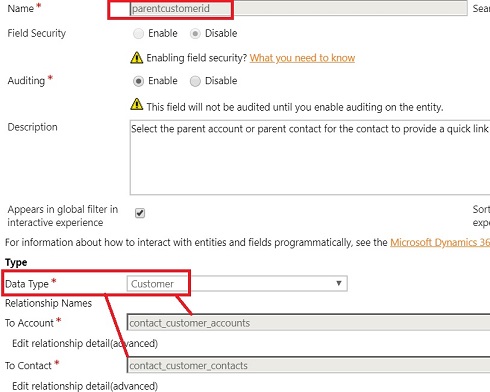
Consider parentcustomerid field of Contact. Though it is a lookup, it is a Customer type lookup. Usually a lookup refers another Entity Type; Customer Type refers two types, namely Account and Contact Entities. If you Open this field’s customisation, you will see below details on two different relationships.


Now suppose I need to filter this loop to show only Accounts of only one Business Types (say BusinessTypecode = 1 for example). We may think of implementing below code.

AccountFilter: function () {
var accFilter = 
"<filter type='and'>
   <condition attribute='businesstypecode' operator='eq' value='1' />
</filter>";
Xrm.Page.getControl("parentcustomerid").addCustomFilter(accFilter,"accdount");
}

//Calling
Xrm.Page.getControl("parentcustomerid").addPreSearch(AccountFilter);

Then you will realise, this is half the solution. Though this filters Accounts correctly, Contacts are Not filtered at all. In fact, we need to filter-out all the contacts as below.

ContactFilter: function () {
var conFilter = 
"<filter type='and'>
   <condition attribute='lastname' operator='eq' value='' />
</filter>";
Xrm.Page.getControl("parentcustomerid").addCustomFilter(conFilter, "contact");
}

//Calling
Xrm.Page.getControl("parentcustomerid").addPreSearch(ContactFilter);

Now we have tried to filter Contacts with null last name. Since Last name is mandatory there are no contacts with null Last name, resulting None of the Contacts are shown for Lookup.

This solves the problem. When you need to filter RegardingObject of Activities, you may need to implement many filtering criteria just like this.

One other thing to keep in mind is, same way we use addPreSearch(), we also can removePreSearch() extension as necessary.

Nov 20, 2017

Enforce Calculation of Rollup fields

Rollup fields are handy in many scenarios, it takes one hours to update by default. If the business case needs real time updating, we can write plugin/WF to enforce the recalculation based on trigger. In such situation, below generic method can be used.

public static void EnforceCalculationRollup(IOrganizationService OrganizationService, EntityReference record, string rollupField)
{
CalculateRollupFieldRequest rollupRequest = new CalculateRollupFieldRequest { Target = record, FieldName = rollupField };
CalculateRollupFieldResponse response = (CalculateRollupFieldResponse)OrganizationService.Execute(rollupRequest);
Entity entity = response.Entity;
OrganizationService.Update(entity);
}

Hope this helps!

Nov 6, 2017

Use Service Calendar programmatically to check user availability

Service Calendar is a key component used in Field service for scheduling the work. Anyway, Calendar alone can be used for many different usages since its showing the working hours/ availability of a User. Here I am illustrating how to pro-grammatically access the calendar.

First of all, lets see how to set users availability in the calendar. In order to make it simple I am going to set if someone is available in given day or not. (not going into different time slots, which is also possible). Go to any User and go to Work Hours. Then go to New Weekly Schedule as below;


Please set the schedule as you wish in the resulting pane as below; Since I am interested in daily basis, I select 24 hours.


Once save you will see calendar been updated.


Now, this is the code snippet to check the availability of the User through calendar;

public static bool IsUserAvailable(IOrganizationService OrganizationService, Guid UserId)
{
    bool isUserAvailable = false;

    QueryScheduleRequest scheduleRequest = new QueryScheduleRequest
    {
        ResourceId = UserId,
        Start = DateTimeUtility.RetrieveLocalTimeFromUTCTime(OrganizationService, DateTime.Now),
        End = DateTimeUtility.RetrieveLocalTimeFromUTCTime(OrganizationService, DateTime.Now.AddSeconds(5)),
        TimeCodes = new TimeCode[] { TimeCode.Available }
    };
    QueryScheduleResponse scheduleResponse = (QueryScheduleResponse)OrganizationService.Execute(scheduleRequest);
    if (scheduleResponse.TimeInfos.Length > 0)
        isUserAvailable = true;

    return isUserAvailable;
}

You may notice that I am passing the local time in QueryScheduleRequest in above code since I am setting the local time zone in the Calendar also. I am also giving here the methods to be be used in time conversions;

internal static DateTime RetrieveLocalTimeFromUTCTime(IOrganizationService service, DateTime utcTime)
{
    return RetrieveLocalTimeFromUTCTime(utcTime, RetrieveCurrentUsersSettings(service), service);
}

internal static int? RetrieveCurrentUsersSettings(IOrganizationService service)
{
    var currentUserSettings = service.RetrieveMultiple(
        new QueryExpression("usersettings")
        {
            ColumnSet = new ColumnSet("timezonecode"),
            Criteria = new FilterExpression
            {
                Conditions =
                {
                            new ConditionExpression("systemuserid", ConditionOperator.EqualUserId)
                }
            }
        }).Entities[0].ToEntity<Entity>();
    return (int?)currentUserSettings.Attributes["timezonecode"];
}

internal static DateTime RetrieveLocalTimeFromUTCTime(DateTime utcTime, int? timeZoneCode, IOrganizationService service)
{
    if (!timeZoneCode.HasValue)
        return DateTime.Now;
    var request = new LocalTimeFromUtcTimeRequest
    {
        TimeZoneCode = timeZoneCode.Value,
        UtcTime = utcTime.ToUniversalTime()
    };
    var response = (LocalTimeFromUtcTimeResponse)service.Execute(request);
    return response.LocalTime;
}

Hope this helps!

Oct 19, 2017

Programmatically Share, Retrieve Shared Users and UnShare a Dynamics 365 record with a User OR Team

This is just to share some simple code snippets relates to sharing. This works well.

Sharing

using Microsoft.Crm.Sdk.Messages;

public static void ShareRecord(IOrganizationService OrganizationService, string entityName, Guid recordId, Guid UserId)
{
    EntityReference recordRef = new EntityReference(entityName, recordId);
    EntityReference User = new EntityReference(SystemUser.EntityLogicalName, UserId);

    //If its a team, Principal should be supplied with the team
    //EntityReference Team = new EntityReference(Team.EntityLogicalName, teamId);

    GrantAccessRequest grantAccessRequest = new GrantAccessRequest
    {
        PrincipalAccess = new PrincipalAccess
        {
            AccessMask = AccessRights.ReadAccess | AccessRights.WriteAccess | AccessRights.AppendToAccess | AccessRights.,
            Principal = User
            //Principal = Team
        },
        Target = recordRef
    };
    OrganizationService.Execute(grantAccessRequest);
}

Its great that VS intellisense would help you identify which Access Right you can set.


Retrieve user who has been shared with
public static void RetrieveSharedUsers(IOrganizationService OrganizationService, EntityReference entityRef)
{
    var accessRequest = new RetrieveSharedPrincipalsAndAccessRequest
    {
        Target = entityRef
    };
    var accessResponse = (RetrieveSharedPrincipalsAndAccessResponse)OrganizationService.Execute(accessRequest);
    foreach (var principalAccess in accessResponse.PrincipalAccesses)
    {
        // principalAccess.Principal.Id - User Id
    }
}

Revoke the Share (UnShare)
 public static void RevokeShareRecord(IOrganizationService OrganizationService, string TargetEntityName, Guid TargetId, Guid UserId)
 {
    EntityReference target = new EntityReference(TargetEntityName, TargetId);
    EntityReference User = new EntityReference(SystemUser.EntityLogicalName, UserId);

    RevokeAccessRequest revokeAccessRequest = new RevokeAccessRequest
    {
        Revokee = User,
        Target = target
    };
    OrganizationService.Execute(revokeAccessRequest);
}

Oct 11, 2017

Console App to Connect to Dynamics 365

One way of testing complex custom codes for Dynamics 365 is executing them using a Console App. This post explains how to create a Console App that enables you to use early bound classes. This can come in handy when you need to test your complex Linq queries before implementing.

1. Once Create empty Console app we need to install below two NuGet Packages;
  • Microsoft.CrmSdk.CoreAssemblies
  • Microsoft.IdentityModel

2. Now Download and reference below Assemblies
  • Microsoft.IdentityModel.Clients.ActiveDirectory.dll
  • Microsoft.Xrm.Tooling.Connector.dll

3. Now create the early bound classes
For this Open the Command Prompt and go to Bin Folder of Dynamics 365 SDK. Then execute CrmSvcUtil.exe. Check given sample command line used for my scenario;

CrmSvcUtil.exe /url:https://xxxx.crm6.dynamics.com/XRMServices/2011/Organization.svc /out:Xrm.cs /username:xxxx@xxxx.onmicrosoft.com /password:xxxxx/namespace:TestConsoleDynamics365 /serviceContextName:TcServiceContext

4. Add the early bound Classes
Add a Class Library file to solution called Xrm.cs and copy relevant content from generated file in previous step. Your solution will now look like this in terms of file structure.


5. Now Open the Program.cs file and do the code as below. This sample consist of one method that uses Linq query to retrieve account name from Id.

using System;
using Microsoft.Xrm.Sdk;
using Microsoft.Xrm.Tooling.Connector;
using System.Linq;

namespace TestConsoleDynamics365
{
    class Program
    {
        static void Main(string[] args)
        {
            Console.WriteLine("Conncetion to Dynamics 365");
            String connectionString = GetServiceConfiguration();

            Console.WriteLine("Conncetion string : " + connectionString);
            Console.WriteLine("Press Enter to move on..");
            Console.ReadLine();

            CrmServiceClient conn = new Microsoft.Xrm.Tooling.Connector.CrmServiceClient(connectionString);

            IOrganizationService _orgService = (IOrganizationService)conn.OrganizationWebProxyClient != null ? (IOrganizationService)conn.OrganizationWebProxyClient : (IOrganizationService)conn.OrganizationServiceProxy;

            //TEST CODE
            Account acc = RetriveAccountById(_orgService, new Guid("628B3A81-CA93-E711-814F-E0071B662BF1"));
            string AccountName = acc != null ? acc.Name : "Nothing Found";
            Console.WriteLine("Sample Account : " + AccountName);
            Console.ReadLine();
        }

        internal static Account RetriveAccountById(IOrganizationService service, Guid Id)
        {
            Account account = null;
            using (TcServiceContext serviceContext = new TcServiceContext(service))
            {
                account = (from c in serviceContext.CreateQuery<Account>()
                           where c.Id == Id
                           select c).FirstOrDefault();
            }
            return account;
        }

        private static string GetServiceConfiguration()
        {
            return "Url = https://xxxxxx.crm6.dynamics.com; Username=xxxx@xxxxx.onmicrosoft.com; Password=xxxxxx; authtype=Office365";
         }
    }
 }

6. Now Run and see. Here is my result;


Note:
My intention is to give simplest code only, though code can be improved according to best practices which I am not discussing here. Ex: storing connection string in the config file.

Sep 14, 2017

Convert in between Local Time and UTC Time

Though this is not a new subject, thought of sharing a simplified version of Code snippet to be used in converting Local Time and UTC Time as necessary. Base for this code was taken from SDK, but I have simplified and made a Ready Made class, which I though is helpful.

Let's remind few reasons why these conversions are very important to Dynmics 365 implementations;
  • DateTime fields are always kept in DB as UTC, but shown in UI with Users Local Time.
  • DateTime Retrieve with Web Service is always UTC.
  • Plugin/WF Context returns UTC time. 
Below are some of the scenarios you may come across that need conversions in your code.
  • When you need to do a calculation based on Time
  • When you need to pass Data to another System

Here is the class I suggest;
using Microsoft.Xrm.Sdk;
using System;
using Microsoft.Crm.Sdk.Messages;
using Microsoft.Xrm.Sdk.Query;

namespace CommonLibrary
{
    internal static class CommonUtility
    {
        internal static DateTime RetrieveLocalTimeFromUTCTime(IOrganizationService service, DateTime utcTime)
        {
            return RetrieveLocalTimeFromUTCTime(utcTime, RetrieveCurrentUsersSettings(service), service);
        }

        internal static DateTime RetrieveUTCTimeFromLocalTime(IOrganizationService service, DateTime localTime)
        {
            return RetrieveUTCTimeFromLocalTime(localTime, RetrieveCurrentUsersSettings(service), service);
        }

        internal static int? RetrieveCurrentUsersSettings(IOrganizationService service)
        {
            var currentUserSettings = service.RetrieveMultiple(
                new QueryExpression("usersettings")
                {
                    ColumnSet = new ColumnSet("timezonecode"),
                    Criteria = new FilterExpression
                    {
                        Conditions =
                        {
                    new ConditionExpression("systemuserid", ConditionOperator.EqualUserId)
                        }
                    }
                }).Entities[0].ToEntity<Entity>();
            return (int?)currentUserSettings.Attributes["timezonecode"];
        }

        internal static DateTime RetrieveLocalTimeFromUTCTime(DateTime utcTime, int? timeZoneCode, IOrganizationService service)
        {
            if (!timeZoneCode.HasValue)
                return DateTime.Now;
            var request = new LocalTimeFromUtcTimeRequest
            {
                TimeZoneCode = timeZoneCode.Value,
                UtcTime = utcTime.ToUniversalTime()
            };
            var response = (LocalTimeFromUtcTimeResponse)service.Execute(request);
            return response.LocalTime;
        }

        internal static DateTime RetrieveUTCTimeFromLocalTime(DateTime localTime, int? timeZoneCode, IOrganizationService service)
        {
            if (!timeZoneCode.HasValue)
                return DateTime.Now;
            var request = new UtcTimeFromLocalTimeRequest
            {
                TimeZoneCode = timeZoneCode.Value,
                LocalTime = localTime
            };
            var response = (UtcTimeFromLocalTimeResponse)service.Execute(request);
            return response.UtcTime;
        }
    }
}

Suppose we need to Retrieve Local time from UTC time (dateTime could be a field coming from Plug-in context);

DateTime dateTimeLocal = CommonUtility.RetrieveLocalTimeFromUTCTime(service, dateTime);

Aug 16, 2017

Code snippet to add Lookup filter

This is just a simple JavaScript to filter lookup based on existing field value in the form.

In this scenario, we will assume we needs to set Payment Method to a lookup field (i.e. new_paymentmethodid). Its user-friendly if we can filter the lookup values to show only the payments of contact (i.e. new_contactid). This code snippet will work for this.

PaymentMethodFilter = function () {
    Xrm.Page.getControl("new_paymentmethodid").addPreSearch(addPaymentMethodFilter);
}

addPaymentMethodFilter = function () {
    var contact = Xrm.Page.getAttribute('new_contactid');
    if ((contact == null) || (contact.getValue() == null) || (contact.getValue()[0] == undefined)) return;
    var paymentMethodFilter = "<filter type='and'><condition attribute='new_paymentowner' uiname='" + contact.getValue()[0].name + "' operator='eq' uitype='contact' value='" + contact.getValue()[0].id + "' /></filter>";
    Xrm.Page.getControl("new_paymentmethodid").addCustomFilter(paymentMethodFilter, "new_paymentmethod");
}

Now call PaymentMethodFilter method for onChange of new_contactid field.

Jul 10, 2017

Call WFs and Actions from Plug-ins

When developing server-side custom functionalities for Dynamics 365, our initial though is whether jump in to plug-ins, WFs or Actions. We always need to check the pros and cons of them depending on the scenario.

By the meantime, separating the functionalities among them and using them harmoniously would add more value in terms of flexibility. Below code snippets could be helpful in such an approach.

Call a WF from a Plug-in;

ExecuteWorkflowRequest request = new ExecuteWorkflowRequest()
{
  WorkflowId = new Guid("019813bc-104b-4dc9-93d5-54d93d79908e"), //WF Id
  EntityId = Id
};
ExecuteWorkflowResponse executeWorkflowResponse = (ExecuteWorkflowResponse)service.Execute(request);

Call an Action from a Plug-in;

OrganizationRequest req = new OrganizationRequest("new_profitcalculator");
req["Amount"] = amount; //Parameter
req["Target"] = new EntityReference(new_office.EntityLogicalName, Id);
OrganizationResponse response = service.Execute(req);